<?xml version="1.0" encoding="utf-8"?><feed xmlns="http://www.w3.org/2005/Atom" ><generator uri="https://jekyllrb.com/" version="4.4.1">Jekyll</generator><link href="/feed.xml" rel="self" type="application/atom+xml" /><link href="/" rel="alternate" type="text/html" /><updated>2026-08-03T12:54:14+01:00</updated><id>/feed.xml</id><title type="html">Nicholas Hadjisavvas</title><subtitle>My projects and opinions</subtitle><entry><title type="html">An LLM are not your everyday,casual household tool.</title><link href="/opinion/2026/06/02/LLM_household_disguise.html" rel="alternate" type="text/html" title="An LLM are not your everyday,casual household tool." /><published>2026-06-02T07:00:00+01:00</published><updated>2026-06-02T07:00:00+01:00</updated><id>/opinion/2026/06/02/LLM_household_disguise</id><content type="html" xml:base="/opinion/2026/06/02/LLM_household_disguise.html"><![CDATA[<p>During the last three years, LLMs in the form of conversational AI have managed to penetrate deeply into the everyday lives of many people with a working computer and an internet connection.</p>

<p>Importantly, we as users of such tools must not forget one extremely important fact. That is, any LLM-powered tool is not merely a result of a technological breakthrough that has magically made its way into our homes. The availability of such tools emerges as a commercial product, developed by for-profit organisations that have the ability to harness this technology and the objective to gain the advantage over their competitors. The main reason for its wide availability is because it enables large scale profit, not because of its potential at leaving a positive and lasting impact for humanity.</p>

<p>Like all products that are catered for the masses, an LLM chatbot needs to be marketed as a simple, specialisation-free tool that can be used by anyone, for anything. But unlike prior historical examples, the case of LLMs carries some unique attributes and differentiating factors. These are:</p>
<ul>
  <li>The mere usage of the word “intelligence” already sets a significant bias, as it leads casual users to expect one specific thing, a product that is actually intelligent.</li>
  <li>LLMs, are largely “black-box” mechanisms. If domain experts have large gaps in their understanding of how LLMs develop specific behaviors, how can anyone expect them to responsibly educate others on safely using AI.</li>
</ul>

<p>Given the above as some of my considerations, one could come to form a number of questions that must urgently be addressed. We list some of them one-by-one while also providing my argumentation on why these are condiderations that we must focus on:</p>

<ol>
  <li>With the en-masse rollout of commodified “intelligence”, a company has the responsibility to educate the intended users on what exactly their product does and how it should safely be used. On the other hand, governments should require such companies to provide the best and most suitable form of transparency and guidelines through strict policy. 
Marketing an AI powered product as a companion, assistant or conversation partner comes with risks that non-specialised users must and should be aware of. The main blockage point for the adoption of this practice is of course the fact that it comes as a hinderance to simplicity. And lack of simplicity makes a product commercially unatractive and commercial unatractiveness is a direct impediment to maximised profit. It’s true that overloading the usage of AI products with a bunch of notices, do’s and dont’s, will make its integration harder for simple users , but the fact is, these simple, casual, non-technically trained users are the ones most vulnerable to the misuse of any intelligent tool. It is the tradeoff of Greater transparency and education against consumer objectives that the companies providing these services must face. It is therefore almost certain that without correct intervention and policy, these companies will keep offering such sophisticated tools without training for better use, in order to ensure their self-preservation and financial well-being.</li>
</ol>

<hr />

<ol>
  <li>Providers need to be held accountable for their choice to roll out a powerful, black-box tool to the public. How can it be normal, that the same state of the art models are being freely and openly provided for household use while also being used for intelligence or defence operations? How can it be accepted that someone can organise their daily agenda using an LLM while someone in the US Department of Defence can use the same model to automate intelligence processes for usage in intelligence or even ground warfare? In general, how is it acceptable that OpenAI can give access to their latest, most advanced model for household use (without proper guidelines and precuations) while also providing the same models for defense and intelligence purposes (even if usage is limited to administrative documentation/reporting)?</li>
</ol>

<p>To my defense, and certainly not to my surprise, real time events while writing this blogpost help to further strengthen the relevance of the above questions. During the last couple of weeks, Anthropic has revoked access to its new frontier model called Fable, after pressure from the US government citing important security considerations. Specifically, it is worth stating that apart from commercial access, Anthropic also prohibited internal use of the model for all employees who are foreign nationals. It is therefore interesting to think that the general public, for a very short period, had access to a tool that the US government itself regards as a potential risk for the country’s national security. Fable is now accessible again, with potential further safeguards now integrated. The US government might feel safer for itself, thus allowing the model’s re-entry into public access. What changes were made, and how these changes have made the usage of the model safer for the everyday consumer, is still unknown.</p>

<h2 id="human-and-ai-llms-effect-on-mental-health">Human and AI: LLMs effect on mental health</h2>

<p>Setting the boundary between personal level interactions of humans with an intelligent-like agent should theoretically be as easy as simply accepting the fact that a conciousless computer algorithm cannot ever act as an emotionally intelligent companion. The emergence of LLMs has given some and continues to provide insights that prove that these boundaries are far more difficult to define and understand in practice than theory.</p>

<p>Recent research publications like this one from MIT media lab attempts to examine psychosocial effects of AI-chatbot usage.</p>

<p>The headlining correlational finding was that higher daily ChatGPT usage correlated with higher loneliness, dependence, problematic use and lower socialization. Heavy users were more likely to consider the chatbot a “friend” or attribute human-like emotions to it. While acknowledging the proprietary nature of such studies and the need for longer-running and more well-informed research on the topic, these initial indicative findings can and should be considered in our cause for building a safer AI usage culture.</p>

<p>The Psychology today article called “The Emotional Implications of the AI Risk Report 2026”, references the above publication to intelligently state the following:</p>

<blockquote>
  <p><strong><em>“A controlled study revealed that people with stronger attachment tendencies and those who viewed AI as potential friends experienced worse psychosocial outcomes from extended daily chatbot use. The participants couldn’t predict their own negative outcomes.</em></strong></p>

  <p><strong><em>Neither can you.</em></strong></p>

  <p><strong><em>This reveals an unsettling irony: We’re building systems that exploit our cognitive biases and the very psychological vulnerabilities that make us poor judges of AI risk. Our loneliness, attachment patterns, and need for validation aren’t bugs AI accidentally triggers—they’re features driving engagement, whether or not developers consciously design for them.”</em></strong></p>
</blockquote>

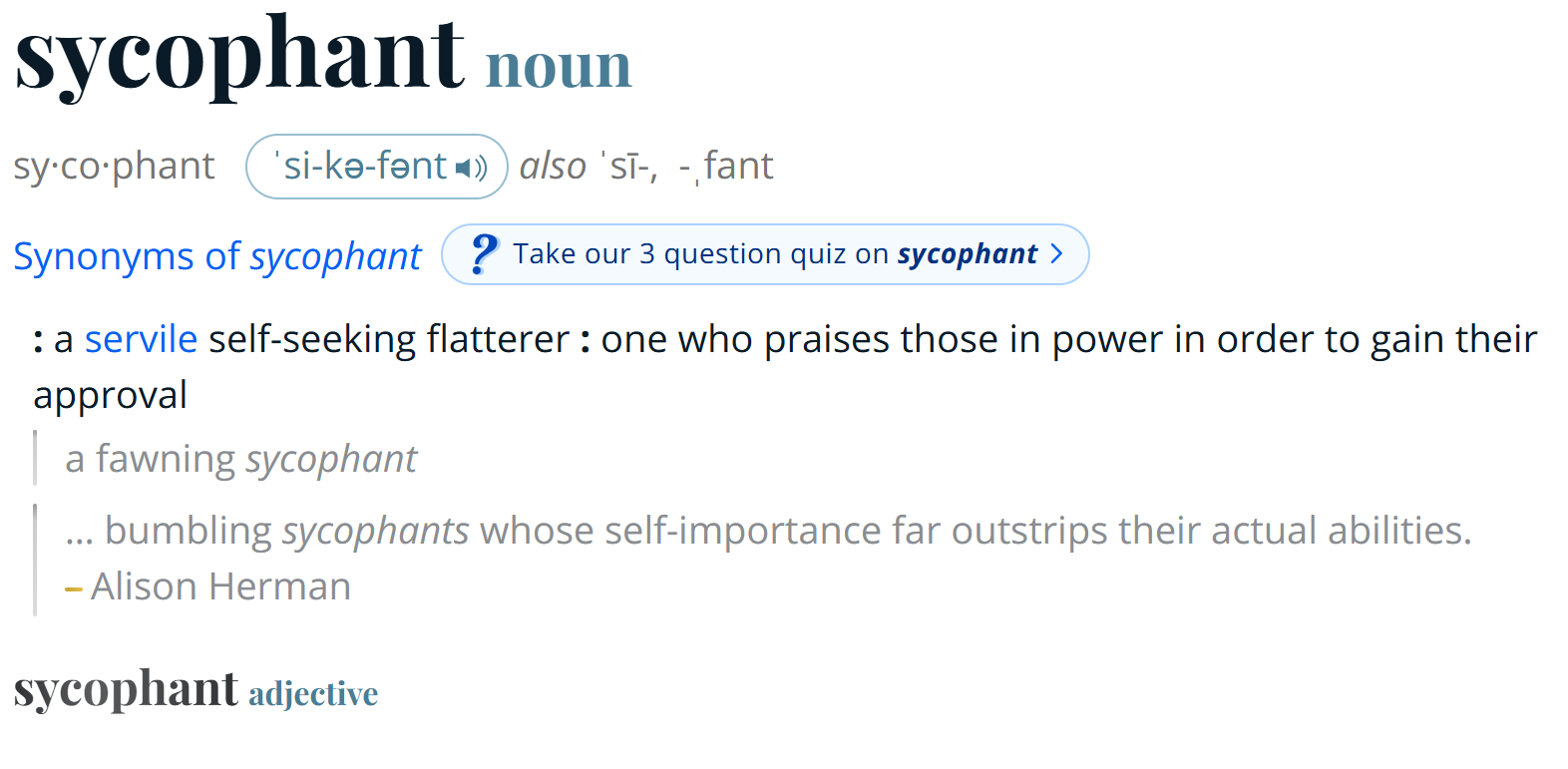
<p>Anyone who has used any prominent LLM for conversational purposes can observe at least one of their consistent behavioral characterestics. This is none other than the LLM’s proclivity to generating affirming responses that agree or even encourage the user’s thoughts without actually logically challenging them. Also known as sycophantic behaviour, this frequently exhibited characterestic has been the focus of several recent research efforts, whose findings raise an alert which can’t and shouldn’t be ignored. Indications tying sycophant AI systems to the user’s hindered social judgement are shown in this <a href="https://www.science.org/doi/10.1126/science.aec8352">Article</a> from March 2026, which concludes that this is a prevalent behavior with broad downstream consequences.</p>

<figure>
  <img src="/assets/images/sycophant-1.jpg" alt="Illustration of a sycophant" />
  <figcaption>Source: <a href="https://wordinfo.info/results/sycophants" target="_blank" rel="noopener">wordinfo.info/results/sycophants</a></figcaption>
</figure>

<figure>
  <img src="/assets/images/sycophant_1.png" alt="Depiction of sycophantic behaviour" />
</figure>

<p>Inspired by these observations, and as a precaution for avoiding even larger and potentially catastrophic consequences, it is of utmost importance to adress the right questions sooner rather than later. It is also important to realise that the responsibility of adressing these issues is not entirely concentrated towards the CEOs or the owners. A corporate executive is an expendable, replacable and mostly predictable link of the chain. The collective bodies of scientists and engineers are the true foundations of the advancements we see today, and the collective behaviour and ethical stance of these communities when facing these issues holds much more weight than the signature of any big tech executive. Being aware of the responsibility and value we carry is therefore a step much needed towards developing ethical, human centered AI.</p>]]></content><author><name></name></author><category term="opinion" /><category term="opinion" /><category term="LLM" /><summary type="html"><![CDATA[The dangers of the manufactured sense of simplicity around LLM tools usage in domestic contexts.]]></summary></entry><entry><title type="html">Building asynchronous, non blocking and scalable applications with Celery and Redis: A case study</title><link href="/software%20development/backend/api%20design/2026/02/01/celery_api.html" rel="alternate" type="text/html" title="Building asynchronous, non blocking and scalable applications with Celery and Redis: A case study" /><published>2026-02-01T06:00:00+00:00</published><updated>2026-02-01T06:00:00+00:00</updated><id>/software%20development/backend/api%20design/2026/02/01/celery_api</id><content type="html" xml:base="/software%20development/backend/api%20design/2026/02/01/celery_api.html"><![CDATA[<p><em>Modern web applications routinely serve thousands of concurrent users. A single architectural decision can make the difference between humming along under load and grinding to a halt: how the system deals with slow, long-running work. In a blocking architecture, a server worker only handles one request at a time. This means that any operation that takes a while — encoding a video, generating a report, sending a batch of emails — makes every other user behind it wait. This is turned on its head by a non-blocking architecture: heavy work is delegated to background workers and the main process is freed almost instantly to keep serving incoming requests. That difference sounds academic until you see it in practice.</em></p>

<h2 id="a-simplified-example">A simplified example</h2>

<p>Imagine this: someone on YouTube is excited to watch the music video for their favorite band’s new song after a fifteen-year break. Just ten seconds in, someone else on the other side of the world starts uploading their nine-hour, no-death Dark Souls 3 speedrun. As soon as the upload begins, the whole platform freezes for everyone. Videos stop playing, comments won’t post, search doesn’t work, and recommendations won’t load. The first user, stuck in the first seconds of the song, just sees a buffering icon—and keeps waiting, because nothing will work until all nine hours of footage of the other user’s upload finish uploading. This is a prime example of an application that does not follow a non-blocking architecture to ensure that smooth user-UI interactions that are not affected by the load of backend processes running on the server side of the application.</p>

<p>In modern applications, one can take this challenge one step further and ask the following question.</p>

<p><em>“My application not only needs to serve users without blocking or freezing when a background process is running, but is also needs to robustly accommodate a large number of such processes as efficiently as possible, while the end users can freely navigate the UI wihout any obstructions.”</em></p>

<p>Therefore, the task is now updated to not only ensuring the non-blocking behaviour of our app, but also how do we accommodate a large number of such non-blocking processes in a manageable way.</p>

<p>Typically, an application based on a non-blocking architecture operates in the following manner:</p>
<ul>
  <li>A user will initiate a long running process via the UI.</li>
  <li>The server does 2 things:
    <ul>
      <li>Registers the process to a broker who will in turn hand the job of executing this process to one of many available workers.</li>
      <li>Lets the user know that their request was received and handed over to a worker for execution (instant acknowledgment).</li>
    </ul>
  </li>
  <li>The user proceeds to do something else, while being able to go back and check on the progress of the process they submitted earlier.</li>
</ul>

<p>But what exactly is a broker and a worker?
A <strong>worker</strong> is a separate process whose entire job is to execute long-running tasks. A <strong>message broker</strong> is a system that is able to take in the requests coming from the server and distribute them to different workers for execution.
The message broker is used to implement a <strong>task queue</strong> which is simply the component which is in charge of temporarily registering processes to be executed until workers can pick them up for execution.</p>

<p>This is precisely where Celery and Redis enter the story. Celery, is a distributed task queue library for Python and Redis is a popular broker choice.
Specifically, Celery provides the worker processes and the machinery for defining, dispatching, and executing background jobs. Redis, in this setup, plays the important role of the message broker: an in-memory data store fast enough to act as the inbox where Celery tasks are queued, claimed, and tracked. When the example Youtube server receives the nine-hour upload from above, it doesn’t process the video itself, it creates a Celery task, Redis adds it into the queue, and immediately returns a response to the uploader. A Celery worker running in its own process (and optionally on its own machine) and sees the new task in Redis, picks it up, and begins the long work of saving and encoding the file. Meanwhile, the web server is free, the music video keeps playing, and our first user never knows any of this happened.</p>

<p align="center">
  <img src="/assets/images/celery_task_queue_flow.svg" alt="Celery task queue flow" />
</p>

<p>The diagram above provides a simple representation of the non-blocking workflow achieved with Celery. The duplication of the User/UI and Web server entities is not literal, it signifies their state at two different times. The top row at time when the user asks for a task to be executed and the bottom row when the user asks for information about the completion status of the task, with the option of retrieving the result if the task has finished.</p>

<hr />

<h2 id="implementing-the-workflow-with-celery">Implementing the workflow with Celery</h2>

<p>Now that we’ve outlined the architecture, let’s see what it actually looks like in code. A Celery setup has three moving parts that we need to wire together: the Celery application (which has information about the broker and the registered tasks), the task definitions (these are the Python functions that the workers will execute), and the client-side component (the web server code that hands work off to the queue). We’ll build each one in turn, using the long video upload from our example as the task to be processed.</p>

<ol>
  <li>
    <p><strong>The Celery application</strong></p>

    <p>The Celery app is the central object that ties everything together. It tells Celery which broker we want to use and where it lives, where to store results, and which functions are available as background tasks. In a typical project, it sits in its own module (something like tasks.py) so that both the web server and the worker process can import it.</p>

    <div class="language-python highlighter-rouge"><div class="highlight"><pre class="highlight"><code><span class="c1"># tasks.py
</span><span class="kn">from</span> <span class="n">celery</span> <span class="kn">import</span> <span class="n">Celery</span>

<span class="n">celery_app</span> <span class="o">=</span> <span class="nc">Celery</span><span class="p">(</span>
   <span class="o">&lt;</span><span class="n">APP_NAME</span><span class="o">&gt;</span><span class="p">,</span>
   <span class="n">broker</span><span class="o">=</span><span class="sh">"</span><span class="s">redis://localhost:6379/0</span><span class="sh">"</span><span class="p">,</span>
   <span class="n">backend</span><span class="o">=</span><span class="sh">"</span><span class="s">redis://localhost:6379/1</span><span class="sh">"</span><span class="p">,</span>
<span class="p">)</span>
</code></pre></div>    </div>

    <ul>
      <li>redis://localhost:6379/0 is where the broker lives, it will be used to add tasks to the queue.</li>
      <li>redis://localhost:6379/1 is the backend, which is where workers will write the outcome of a finished task so the web server can later retrieve it.</li>
    </ul>
  </li>
  <li>
    <p><strong>Defining a task</strong></p>

    <p>A task is just a Python function. It is exactly the process that a worker is supposed to execute in the background. It could be any kind of algorithm - in our Youtube case, this could be the actual processing and upload of a video to a database - and it is decorated with @celery_app.task. The decorator registers the function with the Celery app, which means workers can look at this module and know what operations they have to run if they receive this task from the broker.</p>

    <div class="language-python highlighter-rouge"><div class="highlight"><pre class="highlight"><code><span class="c1"># tasks.py (continued)
</span><span class="kn">import</span> <span class="n">time</span>

<span class="nd">@celery_app.task</span>
<span class="k">def</span> <span class="nf">process_video_upload</span><span class="p">(</span><span class="n">video_id</span><span class="p">:</span> <span class="nb">str</span><span class="p">,</span> <span class="n">file_path</span><span class="p">:</span> <span class="nb">str</span><span class="p">)</span> <span class="o">-&gt;</span> <span class="nb">dict</span><span class="p">:</span>
   <span class="sh">"""</span><span class="s">Encode an uploaded video and generate thumbnails.</span><span class="sh">"""</span>
   <span class="c1"># In a real system: read the file, transcode to multiple
</span>   <span class="c1"># resolutions, generate thumbnails, write to object storage…
</span>   <span class="n">time</span><span class="p">.</span><span class="nf">sleep</span><span class="p">(</span><span class="mi">60</span><span class="p">)</span>  <span class="c1"># stand-in for the actual heavy work
</span>   <span class="k">return</span> <span class="p">{</span>
      <span class="sh">"</span><span class="s">video_id</span><span class="sh">"</span><span class="p">:</span> <span class="n">video_id</span><span class="p">,</span>
      <span class="sh">"</span><span class="s">status</span><span class="sh">"</span><span class="p">:</span> <span class="sh">"</span><span class="s">ready</span><span class="sh">"</span><span class="p">,</span>
      <span class="sh">"</span><span class="s">duration_seconds</span><span class="sh">"</span><span class="p">:</span> <span class="mi">32400</span><span class="p">,</span>
   <span class="p">}</span>

</code></pre></div>    </div>

    <p>As you can see, this is an ordindary Python function. The key to this is the Celery decorator which will let us call this function with an additional .delay() call which will tell Celery to send the call to the queue instead of executing it locally.</p>
  </li>
  <li>
    <p><strong>Dispatch task from the web server</strong></p>

    <p>Now, we want to build the bridge between the user and Celery. In our server, we define a relevant endpoint which when requested, will initialise the task to be executed.</p>

    <div class="language-python highlighter-rouge"><div class="highlight"><pre class="highlight"><code><span class="c1"># views.py (Flask-style for brevity; the same pattern works in Django, FastAPI, etc.)
</span><span class="kn">from</span> <span class="n">flask</span> <span class="kn">import</span> <span class="n">Flask</span><span class="p">,</span> <span class="n">request</span><span class="p">,</span> <span class="n">jsonify</span>
<span class="kn">from</span> <span class="n">tasks</span> <span class="kn">import</span> <span class="n">process_video_upload</span>

<span class="n">app</span> <span class="o">=</span> <span class="nc">Flask</span><span class="p">(</span><span class="n">__name__</span><span class="p">)</span>

<span class="nd">@app.post</span><span class="p">(</span><span class="sh">"</span><span class="s">/upload_video</span><span class="sh">"</span><span class="p">)</span>
<span class="k">def</span> <span class="nf">upload_video</span><span class="p">():</span>
   <span class="n">video_id</span> <span class="o">=</span> <span class="nf">save_uploaded_file</span><span class="p">(</span><span class="n">request</span><span class="p">.</span><span class="n">files</span><span class="p">[</span><span class="sh">"</span><span class="s">video</span><span class="sh">"</span><span class="p">])</span>
   <span class="n">task</span> <span class="o">=</span> <span class="n">process_video_upload</span><span class="p">.</span><span class="nf">delay</span><span class="p">(</span><span class="n">video_id</span><span class="p">,</span> <span class="sa">f</span><span class="sh">"</span><span class="s">/uploads/</span><span class="si">{</span><span class="n">video_id</span><span class="si">}</span><span class="s">.mp4</span><span class="sh">"</span><span class="p">)</span>
   <span class="k">return</span> <span class="nf">jsonify</span><span class="p">({</span><span class="sh">"</span><span class="s">task_id</span><span class="sh">"</span><span class="p">:</span> <span class="n">task</span><span class="p">.</span><span class="nb">id</span><span class="p">,</span> <span class="sh">"</span><span class="s">video_id</span><span class="sh">"</span><span class="p">:</span> <span class="n">video_id</span><span class="p">}),</span> <span class="mi">202</span>
   
</code></pre></div>    </div>

    <p>.delay() does the following under the hood: (a) it serializes the function name and arguments, (b) pushes the resulting message onto the broker, and (c) returns an AsyncResult object almost instantly. From that object we can grab task.id (a UUID generated by Celery) and hand it back to the client with HTTP 202 (“Accepted”), which is the standard response code for the server saying to the client that “I’ve received your request and started working on it, but I’m not done yet”.</p>

    <p>The web server is now free. It has spent milliseconds on this request, regardless of whether the upload was a three-minute music video or a nine-hour speedrun.</p>
  </li>
  <li>
    <p><strong>Running the worker</strong></p>

    <p>In order for jobs to be picked up and be processed, we need active workers that will watch the queue and pick up these jobs.</p>

    <p>Setting up running workers is a separate task, through the command line</p>
    <div class="language-bash highlighter-rouge"><div class="highlight"><pre class="highlight"><code>celery <span class="nt">-A</span> tasks worker <span class="nt">--loglevel</span><span class="o">=</span>info
</code></pre></div>    </div>

    <p>The key point for this is that this command doesn’t have to run on the same machine as the web server. As long a worker can reach the same Redis instance that the server registers queued tasks to, it can pick up tasks. From here on, scaling up to handle more concurrent task executions is siimply a matter of starting more workers, anywhere.</p>
  </li>
  <li>
    <p><strong>Polling for updates</strong></p>

    <p>Recall that Celery instantly provides a task_id to the client side to signify that the task has been received and added to the queue for execution. This task comes in handy for checking on the task’s status in subsequent times. When asking Celery for updates on a submitted job, we can know if the task is pending, running,completed or failed (these are the possible return values most of the time).</p>

    <p>Imagine that buffering icon on many UIs that shows up when something is yet to finish. That buffering icon shows up while the answer of the server when polling for the status of a job is either pending or running. As soon as a polling request returns a completed status, we can retrieve the result and stop showing the buffering icon to the user.</p>

    <p>Implementation-wise, we expose a small status endpoint that looks up the task’s state:</p>

    <div class="language-python highlighter-rouge"><div class="highlight"><pre class="highlight"><code><span class="c1"># views.py (continued)
</span><span class="kn">from</span> <span class="n">celery.result</span> <span class="kn">import</span> <span class="n">AsyncResult</span>
<span class="kn">from</span> <span class="n">tasks</span> <span class="kn">import</span> <span class="n">celery_app</span>

<span class="nd">@app.get</span><span class="p">(</span><span class="sh">"</span><span class="s">/tasks/&lt;task_id&gt;</span><span class="sh">"</span><span class="p">)</span>
<span class="k">def</span> <span class="nf">task_status</span><span class="p">(</span><span class="n">task_id</span><span class="p">:</span> <span class="nb">str</span><span class="p">):</span>
   <span class="n">result</span> <span class="o">=</span> <span class="nc">AsyncResult</span><span class="p">(</span><span class="n">task_id</span><span class="p">,</span> <span class="n">app</span><span class="o">=</span><span class="n">celery_app</span><span class="p">)</span>
   <span class="n">response</span> <span class="o">=</span> <span class="p">{</span><span class="sh">"</span><span class="s">task_id</span><span class="sh">"</span><span class="p">:</span> <span class="n">task_id</span><span class="p">,</span> <span class="sh">"</span><span class="s">state</span><span class="sh">"</span><span class="p">:</span> <span class="n">result</span><span class="p">.</span><span class="n">state</span><span class="p">}</span>
   <span class="k">if</span> <span class="n">result</span><span class="p">.</span><span class="nf">ready</span><span class="p">():</span>
      <span class="n">response</span><span class="p">[</span><span class="sh">"</span><span class="s">result</span><span class="sh">"</span><span class="p">]</span> <span class="o">=</span> <span class="n">result</span><span class="p">.</span><span class="n">result</span> <span class="k">if</span> <span class="n">result</span><span class="p">.</span><span class="nf">successful</span><span class="p">()</span> <span class="k">else</span> <span class="nf">str</span><span class="p">(</span><span class="n">result</span><span class="p">.</span><span class="n">result</span><span class="p">)</span>
   <span class="k">return</span> <span class="nf">jsonify</span><span class="p">(</span><span class="n">response</span><span class="p">)</span>

</code></pre></div>    </div>

    <p>AsyncResult consults the result backend (the /1 Redis database we configured earlier) and reports the task’s current state — PENDING, STARTED, SUCCESS, FAILURE, or RETRY. The browser can poll this endpoint every few seconds and update the UI accordingly: a buffering spinner as we mentioned above while the task is in progress, a success banner once result.ready() returns true.</p>

    <p>This is exactly the polling loop drawn in the bottom row of the diagram above, made concrete.</p>
  </li>
</ol>

<hr />

<h2 id="routing-tasks-to-the-right-workers">Routing tasks to the right workers</h2>

<p>The setup we’ve built so far has a hidden assumption: every worker is equally capable of running every task. In practice, that assumption falls apart fast. Consider our two example tasks side by side: encoding a nine-hour speedrun is CPU-bound and memory-hungry — it might take an hour on a beefy machine and bring a smaller one to its knees. Regenerating a video’s thumbnail, by contrast, takes a couple of seconds and barely registers on the CPU. If both tasks go into the same queue and are picked up by the same pool of workers, two bad things happen.</p>

<p>First, the cheap tasks get stuck behind the expensive ones. A user who just edited their video title and triggered a thumbnail refresh waits behind a speedrun encode that landed in the queue thirty seconds earlier. Second, you’re forced into an awkward sizing decision: either you provision every worker to handle the worst-case task — paying for high-memory machines that spend most of their time regenerating thumbnails — or you provision for the average and watch the expensive tasks crash workers that can’t handle them.</p>

<p>The fix is to give tasks and workers matching labels, so that expensive tasks only land on workers equipped to run them. In Celery, those labels are called queues. We declare which queue a task belongs to, and we start each worker with the list of queues it’s allowed to consume from.</p>

<p>In our python code, tasks can be set up as follows:</p>

<div class="language-python highlighter-rouge"><div class="highlight"><pre class="highlight"><code><span class="c1"># tasks.py
</span><span class="kn">from</span> <span class="n">celery</span> <span class="kn">import</span> <span class="n">Celery</span>

<span class="n">celery_app</span> <span class="o">=</span> <span class="nc">Celery</span><span class="p">(</span>
    <span class="sh">"</span><span class="s">youtube_clone</span><span class="sh">"</span><span class="p">,</span>
    <span class="n">broker</span><span class="o">=</span><span class="sh">"</span><span class="s">redis://localhost:6379/0</span><span class="sh">"</span><span class="p">,</span>
    <span class="n">backend</span><span class="o">=</span><span class="sh">"</span><span class="s">redis://localhost:6379/1</span><span class="sh">"</span><span class="p">,</span>
<span class="p">)</span>

<span class="n">celery_app</span><span class="p">.</span><span class="n">conf</span><span class="p">.</span><span class="n">task_routes</span> <span class="o">=</span> <span class="p">{</span>
    <span class="sh">"</span><span class="s">tasks.process_video_upload</span><span class="sh">"</span><span class="p">:</span>  <span class="p">{</span><span class="sh">"</span><span class="s">queue</span><span class="sh">"</span><span class="p">:</span> <span class="sh">"</span><span class="s">heavy</span><span class="sh">"</span><span class="p">},</span>
    <span class="sh">"</span><span class="s">tasks.regenerate_thumbnail</span><span class="sh">"</span><span class="p">:</span>  <span class="p">{</span><span class="sh">"</span><span class="s">queue</span><span class="sh">"</span><span class="p">:</span> <span class="sh">"</span><span class="s">light</span><span class="sh">"</span><span class="p">},</span>
<span class="p">}</span>

<span class="nd">@celery_app.task</span>
<span class="k">def</span> <span class="nf">process_video_upload</span><span class="p">(</span><span class="n">video_id</span><span class="p">:</span> <span class="nb">str</span><span class="p">,</span> <span class="n">file_path</span><span class="p">:</span> <span class="nb">str</span><span class="p">)</span> <span class="o">-&gt;</span> <span class="nb">dict</span><span class="p">:</span>
    <span class="p">...</span>  <span class="c1"># CPU-heavy: transcode, multiple resolutions, write to storage
</span>
<span class="nd">@celery_app.task</span>
<span class="k">def</span> <span class="nf">regenerate_thumbnail</span><span class="p">(</span><span class="n">video_id</span><span class="p">:</span> <span class="nb">str</span><span class="p">)</span> <span class="o">-&gt;</span> <span class="nb">dict</span><span class="p">:</span>
    <span class="p">...</span>  <span class="c1"># cheap: pull one frame, resize, upload
</span>
</code></pre></div></div>

<p>And our workers setup will be:</p>

<div class="language-bash highlighter-rouge"><div class="highlight"><pre class="highlight"><code><span class="c"># On a high-CPU, high-memory machine — handles encodings only</span>
celery <span class="nt">-A</span> tasks heavy_worker <span class="nt">--loglevel</span><span class="o">=</span>info <span class="nt">-Q</span> heavy <span class="nt">--concurrency</span><span class="o">=</span>2

<span class="c"># On smaller, cheaper machines — handles thumbnails only</span>
celery <span class="nt">-A</span> tasks light_worker <span class="nt">--loglevel</span><span class="o">=</span>info <span class="nt">-Q</span> light <span class="nt">--concurrency</span><span class="o">=</span>8
</code></pre></div></div>

<p>In the above example, we implement and register two Celery tasks called process_video_upload and regenerate_thumbnail. The first one is a hypothetically computationally expensive method that would normally need to be executed within a server/machine that has increased computatinal resources (availability og multi-core CPUs and GPUs). Using the <code class="language-plaintext highlighter-rouge">python
celery_app.conf.task_routes</code> utility, we let the Celery app know that whenever a process_video_upload job is requested, we will only let the heavy_worker to pick it up and execute it. In a similar manner, we assign any regenerate_thumbnail to the ligh queue, making it available only to light_worker.</p>

<p>There’s one more useful trick worth knowing. A worker can subscribe to multiple queues, which lets you create overflow capacity:</p>

<div class="language-bash highlighter-rouge"><div class="highlight"><pre class="highlight"><code>celery <span class="nt">-A</span> tasks flexible_worker <span class="nt">-Q</span> heavy,light <span class="nt">--concurrency</span><span class="o">=</span>2
</code></pre></div></div>

<p>This worker prefers heavy tasks (listed first) but will pick up light tasks if the heavy queue is empty. This comes in handy for fallback behavior, but we must use it carefully. The moment that worker grabs a longer light task, it’s no longer available to process a heavy task it was meant to serve. Typically, we’d want strict separation rather than flexible overflow.</p>

<h2 id="easy-built-in-way-to-monitor-celery-apps">Easy, built-in way to monitor Celery apps</h2>

<p>The setup we’ve built now has tasks flowing through multiple queues, workers of different shapes consuming them, and results landing in Redis. But in terms of monitoring internal state of our Celery app, we can’t really see much. 
If a user complains that their task has been “processing” for an hour, where do we look? Is the task still in the queue? Did a worker pick it up and crash? Is it actually running and just slow?</p>

<p>The answer to the above questions is Flower, a web-based monitoring dashboard for Celery. It connects to the same broker our workers use, listens to the events Celery emits as tasks move through their lifecycle, and gives us a live view of every worker, every queue, and every task in the system. Installing and starting it takes two commands:</p>

<div class="language-bash highlighter-rouge"><div class="highlight"><pre class="highlight"><code>pip <span class="nb">install </span>flower
celery <span class="nt">-A</span> tasks flower <span class="nt">--port</span><span class="o">=</span>5555
</code></pre></div></div>

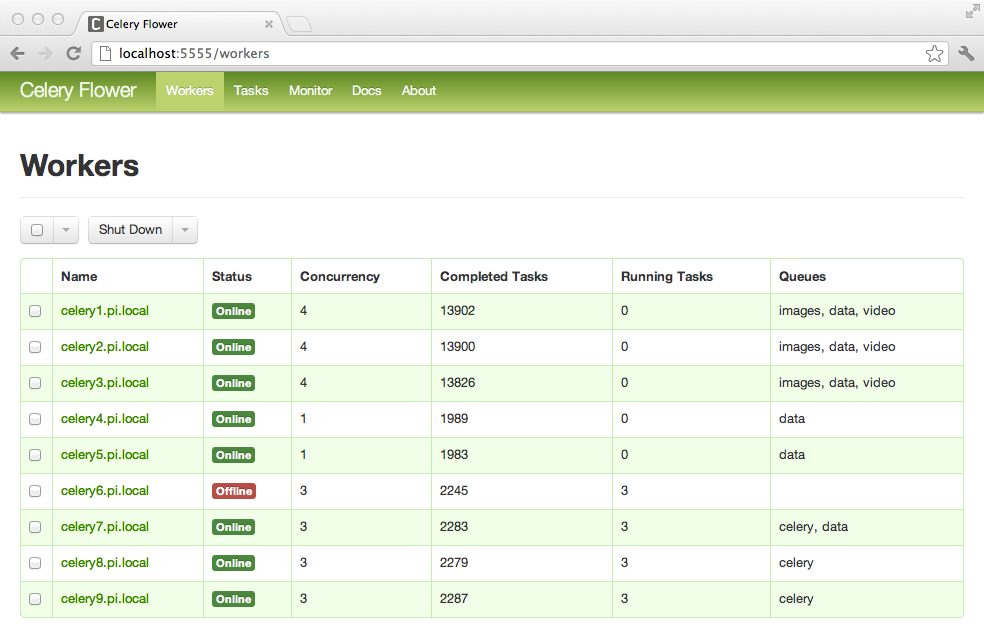
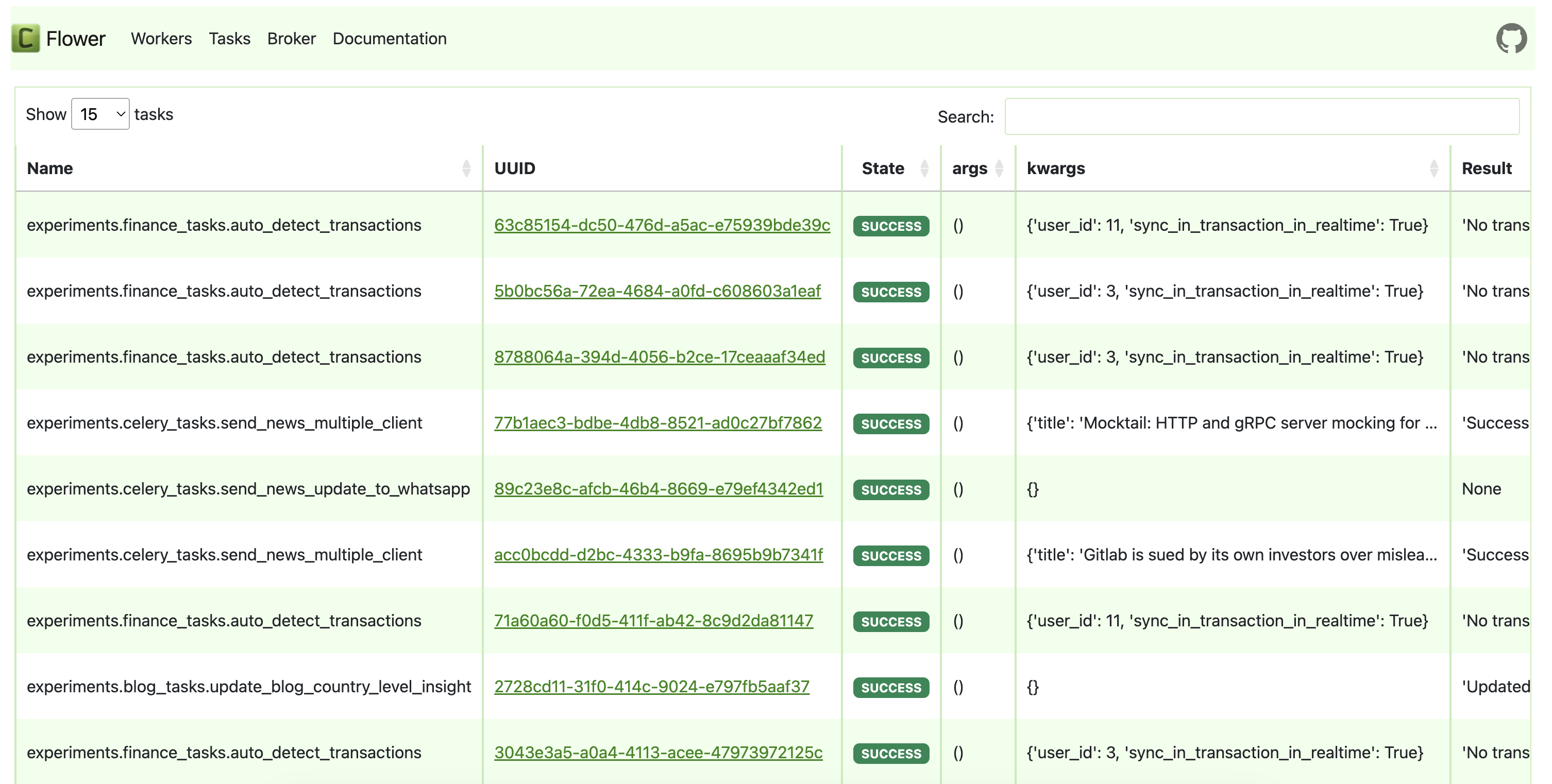
<p>We simply open http://[HOST_ADDRESS]:5555 and get a dashboard showing each connected worker, the queues it’s consuming from, its current concurrency and load, and a live-updating list of tasks with their state (received, started, succeeded, failed, retried). You can click into any individual task to see its arguments, its runtime, its return value or traceback, and which worker handled it.</p>

<p align="center">
  <img src="/assets/images/flower_1.webp" alt="Flower workers monitoring." />
</p>

<p align="center">
  <img src="/assets/images/flower_2.png" alt="Flower tasks monitoring." />
</p>

<h2 id="case-study-3dmotaas--a-horizontally-scalable-motion-searcheditretargeting-platform">Case Study: 3DMotaaS — A Horizontally Scalable Motion Search/Edit/Retargeting Platform</h2>

<p>Now let’s look at a real life application of Celery to one of the projects I’ve worked on recently called 3DMotaaS (3D-Motion-as-a-Service), a platform where users can upload, manage, edit motion capture data as well as well as retrieve similar motion sequences given example motion queries.</p>

<p>The 3DMotaaS platform primarily works with .bvh skeletal animation files. One of the main process features of this service is the automatic (and on demand) unification of all motion data by retargeting all motion input in the platform to one fixed universal skeleton format.</p>

<p>All you need to know to grasp the relevance of Celery to this: Many of the processes offered by this platform can be very computationally intensive (because they require on-demand inference of Deep Learning models with motion capture sequence inputs, which can get really large).</p>

<p>In general, the platform offers features of varying computational costs. 
These can be retargeting motions onto a universal skeleton, encoding them with a Transformer VAE, searching a FAISS index of pre-encoded motion segments, and returning near-neighbor matches that can be downloaded back in .bvh, .fbx, or .glb form. Behind the API, each one of those steps is a long-running, CPU/GPU-bound, Blender- or PyTorch-heavy job — anything from a few seconds (FAISS lookup) to many minutes (model fine-tuning on a user’s dataset).</p>

<p>It is therefore warranted that we implemented the backend of the service with the capabilities of distributing processes across workers of variable processing capabilities, to ensure a smooth running, optimised and non blokcing service to the users.</p>

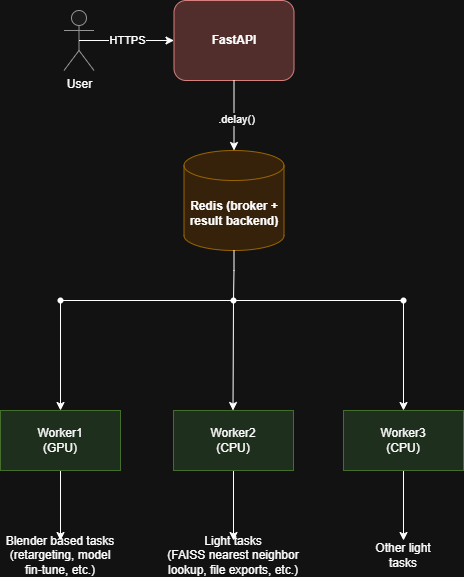
<p>We use Celery + Redis in front of a FastAPI front door to turn that pipeline into something that scales horizontally and never blocks a request thread.</p>

<h3 id="why-celery">Why Celery?</h3>

<p>The platform’s following properties make an async task queue like Celery the obvious fit:</p>

<ol>
  <li>Heterogeneous workloads. As we briefly mentioned earlier, a /retarget job calls into a different conda environment (Blender + a universal-skeleton retargeting pipeline) via subprocess. A /search job loads a PyTorch model and a FAISS index. A /train job runs a fine-tuning loop. We can’t realistically run these inside one single request handler and expect optimal performance.</li>
  <li>Job durations vary. Indexing a single segment (2-3 seconds of motion capture) takes milliseconds, fine-tuning a model takes tens of minutes. Non blocking behaviour is essential.</li>
  <li>Independent jobs, shared infrastructure. Multiple users uploading motion clips at the same time should be distributed across any number of GPUs/CPUs we’ve set up, without manually coordinating this in the application code.</li>
</ol>

<p>Celery gives solutions to all of the above, almost entirely out of the box: a broker (a Redis instance), a result backend (another Redis instance), and a pool of workers we can scale by simply running more celery worker processes on the same machine or across machines pointed at the same Redis.</p>

<p align="center">
  <img src="/assets/images/motaas.drawio.png" alt="Flower workers monitoring." />
</p>

<h3 id="multi-step-pipelines-via-celery-chains">Multi-Step Pipelines via Celery Chains</h3>

<p>Chaining tasks is also permitted in Celery. For example, in our MotaaS platform, certain processes require the completion of several subtasks to be completed in specific sequences. One of these is our search feature, which receives a motion capture animation as input and returns motions which are similar to the query(we also call this search by example).</p>

<p>For search, we need the user’s motion query to first pass through some pre-processing steps in order to be compatible for input to our motion encoding model. Specifically, the search workflow is a two-stage pipeline: retarget the user’s BVH to the universal skeleton, then encode-and-search. We compose it with celery.chain:</p>

<div class="language-python highlighter-rouge"><div class="highlight"><pre class="highlight"><code><span class="k">def</span> <span class="nf">search</span><span class="p">(</span><span class="n">input_path</span><span class="p">,</span> <span class="n">args</span><span class="p">):</span>
   <span class="n">workflow</span> <span class="o">=</span> <span class="nf">chain</span><span class="p">(</span>
         <span class="n">retarget_task</span><span class="p">.</span><span class="nf">s</span><span class="p">(</span><span class="n">input_path</span><span class="p">),</span>
         <span class="n">search_task</span><span class="p">.</span><span class="nf">s</span><span class="p">(</span><span class="n">args</span><span class="p">),</span>
   <span class="p">)</span>
   <span class="k">return</span> <span class="n">workflow</span><span class="p">.</span><span class="nf">apply_async</span><span class="p">()</span>
</code></pre></div></div>

<p>The output of the first task in the sequence (the retarget_task) is automatically fed into the seconds task (search_task) as its first argument. In this case, task_ids are assigned to all involved subtasks as well as the whole parent task. The client simply polls the parent task in the same way it would poll any other non-chained task. Celery conveniently handles the hand-off, the failure propagation, and the result chaining for us.</p>

<h3 id="cancellation-of-tasks">Cancellation of tasks</h3>
<p>In our platform (and also a requirement in most dynamic apps/services), we need the user to be able to cancel a task, for any reason.
Task cancellation is not as straightforward as most of the above, since the running process of a  task that was already picked up by a worker might not be accessible at any time.
Despite that, Celery does provide some utility in terms of task cancellation by registering a task as an abortable task.</p>

<div class="language-python highlighter-rouge"><div class="highlight"><pre class="highlight"><code><span class="nd">@celery_app.task</span><span class="p">(</span><span class="n">bind</span><span class="o">=</span><span class="bp">True</span><span class="p">,</span> <span class="n">base</span><span class="o">=</span><span class="n">AbortableTask</span><span class="p">,</span> <span class="n">soft_time_limit</span><span class="o">=</span><span class="mi">300</span><span class="p">,</span> <span class="n">time_limit</span><span class="o">=</span><span class="mi">600</span><span class="p">)</span>
<span class="k">def</span> <span class="nf">process_bvh_task_abortable</span><span class="p">(</span><span class="n">self</span><span class="p">,</span> <span class="n">input_path</span><span class="p">):</span>
   <span class="k">for</span> <span class="n">i</span> <span class="ow">in</span> <span class="nf">range</span><span class="p">(</span><span class="mi">100</span><span class="p">):</span>
      <span class="k">if</span> <span class="ow">not</span> <span class="n">i</span> <span class="o">%</span> <span class="mi">5</span> <span class="ow">and</span> <span class="n">self</span><span class="p">.</span><span class="nf">is_aborted</span><span class="p">():</span>
         <span class="k">return</span> <span class="p">{</span><span class="sh">'</span><span class="s">status</span><span class="sh">'</span><span class="p">:</span> <span class="sh">'</span><span class="s">aborted</span><span class="sh">'</span><span class="p">,</span> <span class="p">...}</span>
      <span class="nf">process_bvh</span><span class="p">(</span><span class="nf">str</span><span class="p">(</span><span class="n">input_path</span><span class="p">),</span> <span class="nf">str</span><span class="p">(</span><span class="n">out_dir</span><span class="p">))</span>
</code></pre></div></div>

<p>From client-side, a cancel button is pclick, the FastAPI /cancel/{task_id} endpoint then tries a graceful abort() first. If the task is not abortable, or abort fails for some other reason, we fall back to using revoke(terminate=True). Combined with task_track_started=True, we get clean, four-state lifecycle visibility (PENDING / STARTED / SUCCESS / REVOKED) over Redis.</p>

<p>An abortable task method will simply only keep a task running if the .is_aborted() method is not true (loop logic above). As soon as the user requests cancellation of a task via the UI, .is_aborted() will be True, and the task will be revoked from the task queue.</p>]]></content><author><name></name></author><category term="Software development" /><category term="Backend" /><category term="API design" /><summary type="html"><![CDATA[Designing and developing scalable APIs to handle long running tasks with grace.]]></summary></entry></feed>